This feature exists because of a McLaren Senna. I was standing in the LEGO aisle at Walmart staring at a Speed Champions set marked down to $12 and I had no idea if that was a good deal. I pulled up BrickLink on my phone. Searched for the set number. Scrolled through price guides. Tried to do mental math on average sold prices versus what was on the shelf. The whole process took about four minutes and by the end I felt like I was doing homework in the middle of a retail store.
That was the moment GameSetBrick's barcode scanner was born. I wanted one action - point my phone at the box, get an answer. Buy it or skip it. That's it. No fumbling through tabs, no cross-referencing price guides, no mental arithmetic while someone else reaches for the last box on the shelf.
If you have ever stood in a store holding a LEGO box and wondered whether you were about to make a great purchase or overpay by thirty percent, you already understand why this tool exists. The barcode scanner turns a four-minute research project into a two-second answer.
The scanner uses your phone's camera through the browser - no app store download, no permissions dialog beyond camera access. It is built on html5-qrcode, which means it reads standard UPC barcodes, EAN codes, and even QR codes if LEGO ever puts them on boxes. Here is exactly how to use it:
- Open gamesetbrick.com on your phone in any browser - Safari, Chrome, Firefox, Samsung Internet, whatever you have.
- Tap the scan button on the home screen. Your phone will ask for camera permission the first time. Grant it once and you are set for every future scan.
- Point your camera at the barcode on any LEGO box. The scanner reads UPC, EAN, and standard retail barcodes.
- Within about two seconds the full set detail page loads with official images, piece count, theme, minifigure list, and - most importantly - real-time BrickLink market prices with a deal score from 0 to 100.
That deal score tells you instantly whether the price on the shelf is below, at, or above what the set is actually worth on the secondary market. Green means buy. Red means wait. No guesswork, no mental math, no four-minute BrickLink deep dive.
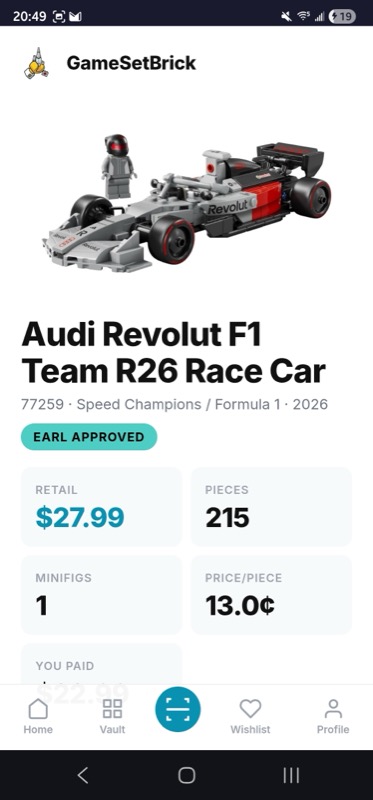
If the barcode will not scan - maybe it is damaged, maybe you are looking at a set online and just have the set number - there is a manual entry fallback. Type the set number directly (like 76919 or 10300) and you get the same result. The scanner is the fast path. Manual entry is the reliable path. Either way you get what you need in seconds.
The scanner is not just a novelty. It solves real problems in real situations that LEGO collectors face every week.
Retail store clearance hunting. Walmart, Target, Barnes and Noble, and Costco all run LEGO clearances at different times. The problem is that a clearance sticker does not tell you whether the discount is actually good relative to market value. I have seen "clearance" prices at Target that were still above what the set sells for on BrickLink. The scanner shows you the real deal score in seconds so you know whether that yellow sticker actually means anything.
Bricks and Minifigs visits. If you have a Bricks and Minifigs store near you, you know the experience - shelves of used and retired sets with handwritten price tags. Some are incredible deals. Some are overpriced. The scanner lets you check every set on the shelf against real market data before you buy. I used it at the Bricks and Minifigs grand opening in Leesburg and it saved me from overpaying on two sets while confirming that a third was a steal.
Facebook Marketplace and garage sales. When someone posts a lot of LEGO sets for sale, you have maybe thirty seconds to check whether the price is worth driving across town. The scanner works on photos too - if you can see the barcode in a listing photo, you can scan it. At garage sales where speed matters even more, point and scan beats typing set numbers by a wide margin.
LEGO conventions and swap meets. Convention tables are overwhelming. Dozens of vendors, hundreds of sets, varying prices. The scanner turns you from a browser into an informed buyer. Scan, check the deal score, negotiate or buy with confidence.
Online price comparison. Even when you are shopping from your couch, the manual entry mode lets you type any set number and see the full market price breakdown. Comparing prices across LEGO.com, Amazon, Walmart.com, and BrickLink becomes trivial when you have the actual secondary market value as your baseline.
I made a deliberate choice not to put GameSetBrick in the App Store or Google Play. Not because I am against native apps - but because the web is faster to ship, faster to update, and does not require you to trust a download before you have even tried the thing. You open a URL, you scan a barcode, you get your answer. If you like it, you can install it to your home screen as a PWA and it behaves exactly like a native app - offline support, full screen, fast load.
The scanner works on any modern phone browser. I have tested it on Safari, Chrome, Firefox, and Samsung Internet. The camera permission request happens once, and after that it is one tap to scan. I have used it at Walmart, Target, Barnes and Noble, and at least three different Bricks and Minifigs locations. It works under fluorescent lighting, in parking lots checking Facebook Marketplace pickups, and at garage sales where you have about thirty seconds before someone else grabs the box.
This matters because most LEGO price-checking tools require you to either download an app you might use once, or navigate a desktop-first website on a tiny phone screen. GameSetBrick is built mobile-first. The scanner button is front and center on the home screen. One tap, camera opens, scan, done. The entire interaction from opening the app to seeing the deal score takes less than five seconds.
There are other ways to check LEGO prices in a store. None of them are as fast or as complete as the GameSetBrick barcode scanner. Here is an honest comparison:
BrickLink mobile website. BrickLink is the gold standard for LEGO market data, and GameSetBrick pulls its price data from BrickLink. The difference is speed and presentation. On BrickLink's mobile site you need to search the set, navigate to the price guide page, select the condition, and interpret the results yourself. GameSetBrick does all of that in one scan and adds a deal score on top. Think of it as a BrickLink frontend optimized for standing in a store.
BrickEconomy. Great resource for historical price data and investment analysis, but it is a desktop-first website without a barcode scanner. Not practical for in-store use.
The LEGO app. Shows retail prices only. It does not show secondary market values, does not calculate deal scores, and does not help you evaluate used or retired sets. Good for checking if something is in stock at LEGO.com, but that is about it.
Amazon app barcode scanner. Shows Amazon's current price, which is often above retail for LEGO sets due to third-party sellers. Does not show BrickLink market data. Useful for one data point but not the full picture.
Manual BrickLink search. This is what I was doing before I built the scanner. It works, but it takes four to five minutes per set and requires you to know the set number. The scanner does the same lookup in two seconds and works with just the barcode.
The key difference is that GameSetBrick combines the data source you trust (BrickLink market prices) with the speed you need (two-second barcode scan) and the context you want (deal score, trend direction, retirement status). No other tool puts all of that together in a mobile-first package.
The barcode scanner is usually the entry point, but it connects to everything else in GameSetBrick. After you scan a set and see the detail page, you can:
- Add the set to your Vault if you buy it, tracking your purchase price and ongoing ROI
- Save it to your wishlist to buy later or share with family for gift ideas
- Check the minifigure values to see if the figs alone justify the price
- See whether the set appears on the Flip Finder as a potential investment
- View the full market price breakdown with new and used values, price history sparklines, and trend direction
The scanner is the front door. The rest of GameSetBrick is the house. Most people start with a scan and end up tracking their entire collection within a week.
A few practical tips from months of using the scanner in the wild:
- Hold steady. The scanner reads fastest when the barcode is centered and your hand is still. Slight movement is fine but constant shaking slows the read.
- Good lighting helps. Fluorescent store lighting is fine. Direct sunlight on a glossy barcode can cause glare - angle the box slightly if needed.
- UPC is on the bottom. Most LEGO boxes have the UPC barcode on the bottom of the box. Some smaller sets have it on the back. Polybags usually have it on the cardboard header.
- Set number fallback. If a barcode is damaged, obscured, or you are scanning from a photo, type the set number manually. You can find it on the box front (usually top right corner) or on the instruction booklet.
- Works on shelf tags too. Some stores put barcodes on the shelf price tags. These often scan correctly and save you from pulling the box off the shelf.
The barcode scanner is just one piece of what GameSetBrick does. The full app tracks your collection, monitors prices, calculates ROI on your investments, tracks Gift With Purchase promotions, and helps you build smarter with a scale calculator. I wrote about the whole platform in the GameSetBrick launch post if you want the complete picture.
But the scanner is where most people start - because the next time you are standing in a store holding a LEGO box and wondering if the price is right, you will want an answer in two seconds, not four minutes. If you are serious about getting the best deals on LEGO, read our guides on the best LEGO sets to buy on Amazon and LEGO investing fundamentals to pair your scanner skills with smart buying strategy.
Ready to scan your first set? Open gamesetbrick.com on your phone and tap the scan button. It is free to use, it is fast, and it works right now - no app store download required. Works on any phone, any browser, any LEGO box.
- GameSetBrick - All Features - See everything GameSetBrick can do
- Introducing GameSetBrick - Full Feature Overview
- Understanding Market Prices and Deal Scores
- The Vault - Your Digital Collection