I have over 200 LEGO sets. Some are sealed on shelves. Some are built and displayed. Some are in storage bins in the closet. And until I built the Vault, I had no real idea what any of it was worth - collectively or individually. I had a rough sense that some sets had appreciated and others had not, but "rough sense" does not cut it when your spouse asks how much money is sitting in the LEGO room.
This is the universal LEGO collector problem. You accumulate sets over months and years. Each purchase makes sense in the moment. But at some point you look at three shelves, two closets, and a storage unit and realize you have no idea what you are looking at in dollar terms. Is it $2,000? $5,000? $15,000? The answer matters for insurance, for buying decisions, for selling decisions, and for an honest conversation about how much of the household budget is made of plastic bricks.
Spreadsheets were the old answer. I tried them. Columns for set number, name, price paid, current value. The problem is that "current value" changes constantly, and nobody is going to manually update 200 rows every week by checking BrickLink. So the spreadsheet goes stale within days and you are back to guessing. The Vault solves this by pulling live market data automatically. You log the set once. The value updates itself.
Adding a set to your Vault in GameSetBrick takes about ten seconds. Here is the complete process:
Step 1: Find the set. You have three options:
- Search by set number or name in the search bar
- Scan the barcode on the box using the barcode scanner
- Browse by theme and find the set in the catalog
Step 2: Tap "Add to Vault." On the set detail page, one tap adds it to your collection.
Step 3: Choose condition. Select from four options:
- New Sealed - unopened in original packaging
- Built Complete - built with all pieces and minifigures present
- Built Incomplete - built but missing some pieces or minifigures
- Parts Only - pieces without complete set construction
Condition matters because BrickLink prices differ significantly between new sealed and used complete. A retired set might be worth $400 sealed and $280 built complete. The Vault uses the correct price for your specific condition.
Step 4: Enter what you paid. Type your purchase price. This enables ROI tracking - GameSetBrick will calculate your return by comparing what you paid to the current market value. If you do not remember the exact price, use the retail price at the time of purchase as a reasonable estimate.
Step 5: Done. The Vault immediately pulls the current BrickLink market value for that condition and shows you the difference - green if you are up, red if you are down. Your dashboard total collection value updates in real time.
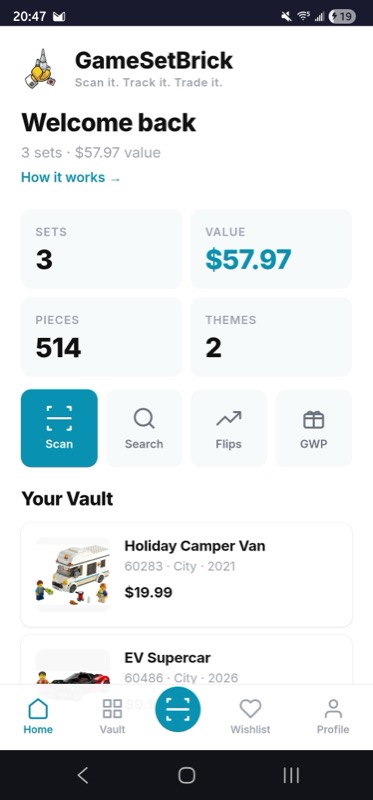
Once you have sets in your Vault, the GameSetBrick dashboard becomes your collection command center. Here is what you see:
Total collection value. The aggregate market value of every set in your Vault, updated in real time with BrickLink data. This is the number that answers "what is my collection worth?"
Total invested. The sum of all purchase prices you entered. This is your cost basis.
Total gain or loss. Market value minus cost. Green means your collection has appreciated. Red means it has depreciated overall.
Overall ROI percentage. Your total return on investment across the entire collection.
Theme breakdown. See how your value is distributed across themes. You might discover that 40% of your collection value is in Star Wars, 25% in modular buildings, and the rest spread across other themes. This breakdown helps you understand your exposure and diversification.
Individual set cards. Each set shows its image, name, condition, current value, and per-set gain or loss. Sort by value, by gain, by loss, by theme, or by date added. Multiple copies are fully supported - if you bought two of the same set (one to build and one to hold sealed), each entry tracks independently with its own condition, price paid, and current value.
Automatic price updates. This is the fundamental advantage. BrickLink market prices change daily as new transactions occur. The Vault reflects those changes automatically. Your spreadsheet does not. Over the course of a month, a spreadsheet can drift 10-20% from reality as prices move. The Vault stays current without any effort from you.
Condition-specific pricing. A sealed set and a built set have very different market values. The Vault tracks the correct price for your specific condition. Most spreadsheet trackers only reference one price, usually new sealed, which overstates the value of built sets.
Cloud sync across devices. Everything in your Vault syncs to the cloud through Firebase. Log a set on your phone at a store, and it shows up on your laptop when you get home. No manual backup. No lost data if you clear your browser cache. Your collection is safe and accessible from any device where you sign in.
Multiple copies. If you own two, three, or ten copies of the same set in different conditions, each gets its own entry with independent tracking. Your sealed investment copy and your built display copy are tracked separately with separate valuations.
Minifigure integration. The Vault connects to minifigure tracking. Every set you add to the Vault shows its included minifigures with individual values. Your total collection value includes the minifigure portfolio data, giving you a more complete picture than set-level pricing alone.
Duplicate prevention for wishlists. When a set is in your Vault, it is automatically excluded from your wishlist. This prevents the classic duplicate gift problem - your family can buy anything on your shared wishlist with confidence that you do not already own it.
Your collection data is valuable and GameSetBrick treats it that way:
Cloud sync. Automatic, continuous, across every device where you sign in. Add a set from your phone at a convention, and it is in your Vault on your tablet at home before you get back.
CSV export. When you need the data outside GameSetBrick - for insurance documentation, for selling decisions, or because you like spreadsheets - the CSV export gives you everything: set number, name, theme, condition, price paid, current market value, gain or loss, and date added. One tap, clean file, ready for Excel or Google Sheets.
Shareable public Vault URL. Something I added after a friend asked to see my collection. Instead of taking photos of shelves, I just sent a link. It shows your sets, your themes, and your total count - without exposing what you paid. It is a collection showcase that happens to be backed by real data. Share it with friends, post it in your LUG, or add it to your AFOL profile anywhere. If you are new to the adult LEGO community, our AFOL 101 guide covers the basics of connecting with other collectors.
New purchase logging. Buy a set, scan the barcode, add to Vault, enter price. Ten seconds, done. Over time your Vault becomes a complete purchase history with real-time valuations.
Collection audit. Walk through your shelves and storage, adding every set you own. Most collectors do this over a few sessions - it is satisfying to watch the total value climb as you add sets you had forgotten about. Our LEGO sorting guide can help you organize the physical collection while you digitize it.
Insurance documentation. Export your Vault to CSV for homeowner's or renter's insurance. The itemized list with current market values is exactly what insurers want for valuable collections.
Selling decisions. Sort by ROI to find sets that have peaked and might be worth selling. Sort by loss to identify sets you should sell before they depreciate further. The data removes emotion from selling decisions and replaces it with clear financial analysis.
Buying decisions. Before buying a new set, check whether you already own it (prevents accidental duplicates) and check the deal score to make sure the price is fair. The Vault and the price checker work together to make every purchase informed.
Gift coordination. Share your wishlist with family. Because the wishlist automatically excludes sets already in your Vault, gift-givers can buy with confidence. No more duplicate LEGO gifts at Christmas.
Spreadsheets. Maximum flexibility but maximum maintenance. No automatic price updates, no barcode scanning, no cloud sync between devices. The Vault automates everything a spreadsheet makes you do manually.
Brickset collection. Brickset lets you mark sets as owned and wanted, with excellent set data and community features. However, it does not pull live BrickLink market values, does not track purchase prices, does not calculate ROI, and does not offer barcode scanning. Good for a basic inventory, not for price-aware collection management.
BrickLink wanted lists. Designed for tracking sets you want to buy, not sets you own. No collection valuation, no ROI tracking. We wrote a BrickLink wanted lists guide that explains how to use wanted lists alongside your GameSetBrick Vault.
Paid apps. Several paid LEGO collection apps exist with subscription fees. GameSetBrick's Vault is free to use with no subscription - you get live market values, ROI tracking, cloud sync, CSV export, and barcode scanning without paying anything.
Physical catalogs and photo inventories. Some collectors photograph every set or keep paper records. These are good for visual reference but provide no market valuation, no trend tracking, and no way to quickly answer "what is it all worth?"
The Vault combines the core features collectors need - inventory management, live pricing, purchase tracking, ROI calculation, cloud sync, and data export - in a single free tool that runs in your browser on any device.
The Vault is the core of GameSetBrick, and everything else - the scanner, the deal scores, the ROI tracking, the Flip Finder, the GWP tracker - connects back to it. I covered the full platform in the GameSetBrick launch post if you want to see how all the pieces fit together.
But start with the Vault. Add your first ten sets. Watch the total value update. Once you see what your collection is actually worth, you will want to add everything. And if you are building a display for your collection, check our LEGO display ideas guide and small space display solutions for inspiration on showing off the sets your Vault is tracking.
Start tracking your collection today at gamesetbrick.com. It is free to use, it syncs everywhere, requires no app store download, and it finally answers the question: what is all this LEGO actually worth?
- GameSetBrick - All Features - See everything GameSetBrick can do
- How to Use the Barcode Scanner
- ROI and Investment Tracking
- Understanding Market Prices and Deal Scores