Every birthday and holiday season, the same conversation happens. Someone who loves you asks what LEGO set you want. You say a set name. They look confused. You say the set number. They write it down wrong. They go to the store and buy something that looks similar but is not the right one. Or they get the right set but you already own it. Or they search online and find three different versions at wildly different prices and pick the worst option because they do not know the difference.
I have received duplicate sets as gifts. I have received sets from themes I do not collect. I have watched well-meaning family members overpay on Amazon for a set that was in stock at retail on LEGO.com. None of this is their fault. LEGO's product catalog is enormous and confusing to anyone who is not already deep in the hobby. There are thousands of active sets across dozens of themes, and set numbers mean nothing to non-collectors.
What your family and friends need is not a list of set numbers scribbled on a napkin. They need a visual list with pictures, names, prices, and a buy button for each set. That is exactly what GameSetBrick's wishlist sharing gives them - and it is the feature that might get more use than anything else in the app, especially from October through December.
Step 1: Find sets you want. Browse GameSetBrick by theme, search by set name or number, or scan barcodes in a store using the barcode scanner. Any set in the database can be added to your wishlist.
Step 2: Tap the wishlist button. On any set detail page, one tap saves it to your wishlist. Build your list over time as you discover sets you are interested in. There is no limit, no categories to manage, no complicated organization. It is a simple list of sets you want.
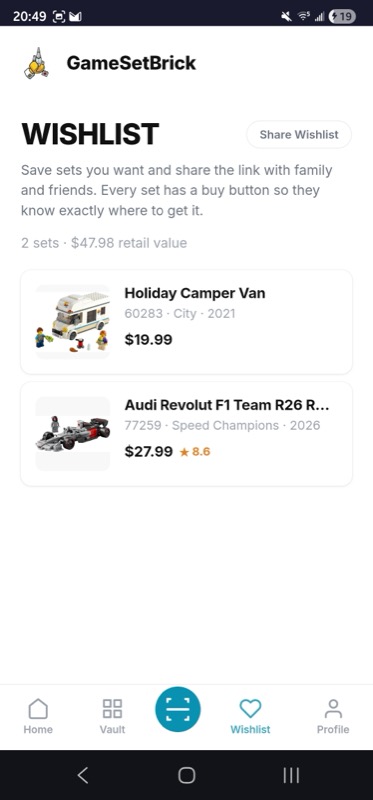
Step 3: Share the link. Tap the share button and copy the URL. Send it to anyone - your partner, your parents, your kids, your Secret Santa match, your LEGO-gifting friend group. Text it, email it, post it in a family group chat. The link works for anyone who opens it, no GameSetBrick account required on their end.
Step 4: They see exactly what to buy. When your gift-giver opens the link, they see your wishlist with:
- Set images - clear photos so they know what the box looks like
- Set names and numbers - for searching in stores or online
- Piece counts and theme information - so they understand what they are buying
- Retail status - whether the set is currently available, retiring soon, or already retired
- Buy buttons - direct links to where they can purchase each set
Step 5: They buy with confidence. No searching through thousands of LEGO sets. No guessing which set you meant. No accidentally buying a set from a different theme that looks vaguely similar. They tap a buy button and get exactly the right set.
Automatic duplicate prevention. If a set is already in your Vault (your tracked collection), it will not appear on your wishlist. This prevents the classic duplicate gift problem automatically. Your family can buy anything on the list with confidence that you do not already own it. If you add a set to your Vault after someone buys it for you, it drops off the wishlist the next time anyone views it.
Live URL that stays current. You share the link once and it stays updated. Send it in October, keep adding sets through November and December, and your family always sees the latest version. No need to resend the link every time you update your list. This is a huge advantage over writing a list on paper or in a text message - your wishlist is a living document.
Cloud sync across devices. Your wishlist syncs across all your devices through Firebase, just like your Vault. Add a set from your phone while browsing at a store, and it is on your wishlist when you share the link from your laptop later. No manual syncing, no exporting, no maintaining separate lists.
Retirement status alerts. Every set on the shared wishlist shows its current retail status - whether it is available, retiring soon, or already retired. This helps gift-givers prioritize: if a set is about to retire, they know to grab it now rather than waiting for a sale that might never come. It is a subtle detail that prevents the disappointment of someone trying to buy a set that is no longer in stores.
Price visibility. Gift-givers can see the retail price for each set, which helps them choose something within their budget. A wishlist with 20 sets ranging from $15 to $500 gives gift-givers at every price point something to work with.
Birthday gifts. Send the link to your spouse, parents, or friends a few weeks before your birthday. Everyone who wants to buy you a LEGO gift sees the same list, can pick from available options, and knows that nothing on the list is something you already own. Birthday LEGO gift success rate goes from about 50% (random guessing) to 100% (informed selection).
Holiday gift guides for family. The holiday season is when the LEGO wishlist gets the most use. Send the link to your extended family in early November. Aunts, uncles, grandparents, and Secret Santa participants all see the same list. They can coordinate among themselves if they want - no need for you to manage who is buying what. Just keep your wishlist current and let the link do the work.
Kids' wishlists. If your kids are LEGO fans, help them build a wishlist in GameSetBrick and share it with grandparents and relatives. Kids are terrible at communicating exactly which set they want - they say "the big Star Wars one" and leave adults guessing. A visual wishlist with pictures eliminates the guesswork entirely.
LEGO User Group exchanges. LUG gift exchanges and Secret Santa events are easier when everyone shares a wishlist. Instead of trying to guess what a fellow AFOL might want, check their list. Our AFOL 101 guide covers how to find and join a local LEGO user group.
Wedding or housewarming registries. Non-traditional but increasingly popular. If you and your partner are LEGO fans, a GameSetBrick wishlist makes a practical gift registry supplement. Share it alongside your traditional registry for friends and family who know you love LEGO.
Treating yourself. Even if you are buying for yourself, the wishlist is a useful planning tool. Save sets you are considering over time, then review the list when you have budget to spend. Seeing all your candidates in one place helps you prioritize better than browsing LEGO.com and impulse-buying whatever catches your eye.
Include a range of prices. A wishlist with only $300 or more sets limits who can buy from it. Include some $20 to $50 sets so that every gift-giver has options. Speed Champions sets, small Architecture sets, and polybags are great affordable wishlist additions. Check our best LEGO sets to buy on Amazon guide for ideas at every price point.
Update regularly. Add new sets as they are released and remove sets you have lost interest in. Because the link is live, your family always sees the current version. A stale wishlist with sets that have been retired for months frustrates gift-givers who try to buy something unavailable.
Note sets retiring soon. If a set on your wishlist is approaching retirement, mention it when you share the link. A quick "the Architecture set is retiring this month, grab it first if you can" helps gift-givers prioritize. The Flip Finder and the sets retiring in 2026 guide can help you identify which sets need urgency.
Combine with your Vault. The more complete your Vault collection is, the better the duplicate prevention works. Take the time to add all your current sets to the Vault so that the wishlist accurately reflects only sets you do not own.
Share early. Do not wait until the week before a holiday to share your wishlist. Give gift-givers time to browse, compare options, and make a decision. Sharing 4 to 6 weeks before a holiday is ideal. This also gives them time to watch for sales - the deal score on each set helps them know if the current price is fair.
Amazon wishlist. Amazon wishlists work well for general products, but LEGO pricing on Amazon is often inflated by third-party sellers. Your gift-giver might overpay for a set that is available at retail elsewhere. GameSetBrick shows buy buttons that lead to the best available purchase option, not just Amazon.
Text message or email list. Simple but limited. No images, no buy buttons, no automatic duplicate prevention, no live updates. The gift-giver still has to search for each set, figure out which version is correct, and hope it is not something you already own.
LEGO.com wishlist. LEGO.com lets you save sets, but the sharing options are limited and it only shows LEGO.com prices. Sets that are cheaper elsewhere or available from other retailers are not reflected.
Paper list. The traditional approach. Write down set names and numbers, hope everyone can read your handwriting, hope they search for the right thing, hope they do not buy you a duplicate. Works in theory, fails in practice.
Brickset wanted list. Brickset's wanted list tracks sets you want but is designed for the collector themselves, not for sharing with non-LEGO-fan family members. The interface assumes familiarity with set numbers and LEGO terminology. We have a BrickLink wanted lists guide that covers how to use wanted lists for personal tracking.
GameSetBrick's wishlist is designed specifically for the sharing use case - visual, simple for non-collectors to use, with buy buttons and automatic duplicate prevention. It is the only option built for the gift-giver, not just the collector.
The wishlist is one of GameSetBrick's simplest features but it might be the one that gets the most use around the holidays. I covered the full platform - collection tracking, price monitoring, barcode scanning, investment ROI, GWP tracking, and more - in the GameSetBrick launch post.
But if all you do is build a wishlist and share the link, you have already solved the LEGO gift problem. No more duplicates. No more wrong sets. No more overpaying. No more disappointed faces when the wrapping paper comes off. Just the right set, at the right price, every time. If you need inspiration for what to add to your list, browse our best LEGO sets for adults guide or check the latest Architecture sets ranked.
Create your LEGO wishlist and share it with anyone at gamesetbrick.com. It is free to use, shareable with one tap, and requires no app store download. Works on any device, any browser. Your next birthday or holiday gift is one shared link away from being exactly what you wanted.
- GameSetBrick - All Features - See everything GameSetBrick can do
- Introducing GameSetBrick - Full Feature Overview
- The Vault - Your Digital Collection
- Christmas Wishlist Guide