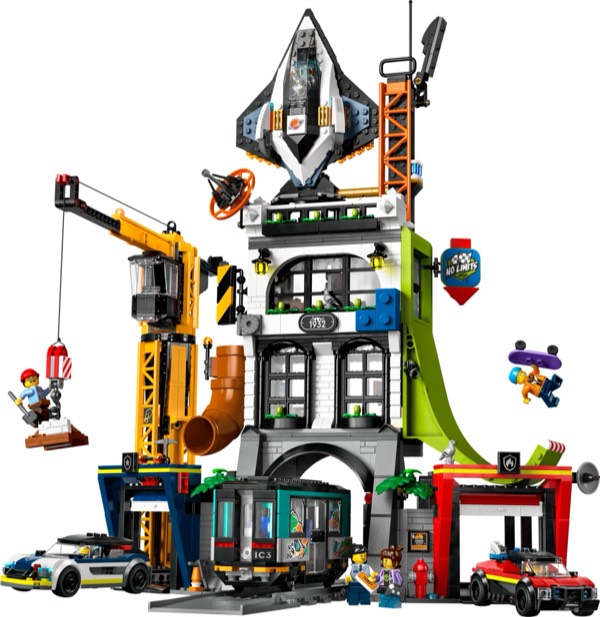
The City Tower is something LEGO City has needed for a long time: a tall building. At 1,941 pieces and roughly three and a half hours, this build goes up rather than out, which is a refreshing change from the typically wide, low-rise City sets. The construction is organized by floor, and each level adds height to the growing tower in a way that is genuinely exciting. You watch your LEGO City get its first real skyline element, and that sense of vertical progress keeps the build engaging throughout. There is a primal satisfaction to building upward that flat builds cannot replicate. Each completed floor represents visible progress, and the tower's growing height on your table provides constant motivation to keep going.
The ground floor is a commercial lobby with a reception desk, elevators, and a small retail space. The second and third floors are office spaces with desks, computers, and meeting room details. The upper floors transition to residential apartments with living spaces and balconies. The build gets slightly repetitive through the middle office floors, as the floor plates and wall sections follow similar patterns, but LEGO has added enough variation in interior details and exterior facade treatments to prevent monotony from setting in. The office floors are where the set is most honest about its limitations. Building essentially the same floor plate twice with different furniture arrangements is not thrilling. But it is realistic - real mixed-use towers have repetitive office floors too - and the set acknowledges this by keeping the office section short and moving quickly to the more interesting residential levels.
The roof section is the final reward, with a rooftop terrace, mechanical penthouse, and antenna array that gives the tower its finished skyline silhouette. The last piece you place is the antenna tip, and looking down at the completed tower from above is a satisfying moment that justifies the entire build. There is also a practical satisfaction to the build completion: the moment you set the finished tower into your City layout and step back to see the skyline effect for the first time. That single vertical element transforms the entire layout from a collection of buildings into something that reads as an actual urban environment. It is remarkable how much visual impact one tall structure provides.
The modular floor system is the key technique here. Each floor is built as a self-contained section that stacks onto the one below, with alignment pins ensuring everything lines up correctly. This is important because it means you can rearrange floors, add custom levels, or extend the tower with your own designs. The system is elegant in its simplicity and educational for anyone who wants to build custom tall structures. The alignment pin system deserves particular attention because it solves the most common problem in multi-story LEGO construction: floors that drift out of alignment as the tower gets taller. By using positive-locking pins at each junction, the tower maintains perfect vertical alignment regardless of how many stories you stack. If you have ever built a tall MOC that started leaning by the fifth floor, this set shows you how to prevent that.
The facade treatment varies by floor level, which is a technique choice worth studying. The ground floor uses large window panels and a recessed entrance for commercial character. The office floors use a curtain wall technique with repeating window modules in a grid pattern. The residential floors break up the grid with balcony projections and varied window sizes. The progression from commercial to office to residential teaches you how real mixed-use buildings are designed, and the facade techniques for each zone are directly transferable to custom builds. The balcony construction on the residential floors is especially well-executed. Each balcony projects outward from the facade using bracket connections that create a clean overhang without visible support from below. The technique is simple - a plate mounted on a bracket with a railing element on the front edge - but the visual effect of multiple balconies breaking up an otherwise flat facade is significant.
The elevator shaft is a continuous vertical channel through all floors, built with consistent connection points at each level. It does not have a moving elevator, but the shaft structure itself is a useful lesson in vertical alignment across a multi-story build. The shaft also serves a structural purpose, acting as a spine that helps keep the tower rigid as it gets taller. This dual function - decorative and structural - is a design principle worth noting for any builder who wants to incorporate vertical features into multi-story MOCs.
1,941 pieces dominated by medium blue, light bluish gray, dark bluish gray, and white. The blue and gray combination is the urban builder's bread and butter, and this set provides generous quantities of plates, tiles, and window panels in these colors. The transparent window panel elements are particularly valuable, as modern architecture MOCs consume these pieces in large numbers. A single modern tower can eat through a dozen or more transparent panels, and this set provides enough to stock your parts bins for multiple future projects. The medium blue elements are also noteworthy because that particular shade is less common than standard blue, making it harder to accumulate from other sources.
The minifigure selection includes office workers, residents, a receptionist, and a delivery person, giving you a cross-section of urban life. The interior furniture elements cover commercial, office, and residential scenarios, which means you get three different types of interior accessories in one set. The structural plates for the floor system are useful for any multi-story building project. The floor plates themselves are a highlight of the haul because they provide large, flat surfaces in the right dimensions for building additional stories. If you want to extend the tower or build a different multi-story structure, these plates are exactly what you need.
The smaller accessory elements round out the haul nicely. Desks, chairs, computer screens, coffee makers, potted plants, and various domestic items give you a comprehensive micro-furnishing collection for both commercial and residential interiors. These are the kinds of pieces that bring interiors to life and that are tedious to accumulate individually. Getting them all in one set, organized by floor type, is a genuine convenience bonus on top of the structural elements.
The City Tower's greatest contribution is vertical presence. At roughly 18 inches tall, it is the tallest building in most LEGO City layouts, and that height transforms the visual character of whatever it sits next to. Roads, parks, and smaller buildings suddenly look more urban, more city-like, because they have a tall building providing context and scale. The transformation is not subtle. Place this tower behind a row of standard City buildings and the entire layout changes character from "suburban" to "urban" in an instant. That single visual shift is the tower's most valuable display quality, and it works every time.
The blue and gray facade is clean and modern, reading correctly as a contemporary mixed-use tower. The varying facade treatments on different floors prevent the building from looking like a uniform column, and the balcony projections on the residential levels add visual rhythm to the upper sections. The rooftop terrace and antenna provide a satisfying cap to the vertical composition. From the side, the tower presents well because the facade variation creates visual interest on all four faces. From above, the rooftop terrace with its plantings and seating areas adds a splash of green and color that rewards the overhead view. The tower looks good from every angle, which is important for a centerpiece that will be seen from multiple perspectives in a layout.
Displayed on its own, the City Tower is a competent but not spectacular building. Displayed as part of a LEGO City layout, it becomes a transformative element that elevates everything around it. Context is everything with this set, and in the right context, it is superb. The tower also photographs well, which matters for builders who share their layouts online. Its clean lines, modern color scheme, and strong vertical profile make it the kind of building that anchors a layout photo and gives the viewer's eye something to travel toward. In photographs, it makes your layout look professional.
The City Tower is for the builder who looks at their LEGO City layout and thinks "this looks like a suburb." It is for anyone who has lined up a dozen City buildings on a table and felt that something was missing from the skyline. That something was height. A city without a tall building is a town, and this set provides the vertical element that elevates your layout from a collection of two-story structures into an actual urban environment. If you build City, this is the set that transforms the entire visual identity of your layout with a single addition.
It is also a strong choice for builders interested in real-world architectural concepts. The mixed-use tower format - commercial at the ground level, offices in the middle, residential at the top - is one of the most common building types in modern urban development. Building one teaches you the logic of how real cities organize vertical space, and the facade treatment variation across floor types is a practical lesson in architectural design language. If you are a builder who uses LEGO to understand the built environment, the City Tower is an excellent case study in mixed-use urban design.
Younger builders who are developing their LEGO City layouts will find this set particularly exciting because it is the first time their city has a skyline. There is a specific joy in placing a tall building for the first time and seeing your layout change character, and this set delivers that moment reliably. For adult builders, the tower satisfies the need for architectural variety in a theme that has historically been too horizontal. Either way, the City Tower serves a need that LEGO City has had for years, and it serves it well.
The City Tower represents a philosophical shift for the LEGO City theme that is worth examining. For decades, City buildings have been wide and low, typically two stories tall with a maximum height of around 8 inches. This design choice was driven by play features - wider buildings have more accessible interiors for minifigure play. But it created a visual problem: LEGO cities did not look like cities. They looked like towns, because towns are defined by low-rise buildings and cities are defined by skylines. The City Tower acknowledges this problem and addresses it directly by going vertical.
The modular floor system is the engineering solution that makes vertical building practical. Without it, a tall LEGO City building would be a single massive structure that is difficult to build, impossible to access for play, and fragile to move. By breaking the tower into stackable floor sections, LEGO gets the best of both worlds: the visual impact of height with the practical accessibility of modular construction. You can lift off any floor to access the interior below, rearrange floors to customize the tower, or remove sections to reduce the height for smaller layouts. This flexibility is what makes the tower work as both a display piece and a play set.
Paired with the Central Train Station, the City Tower gives LEGO City a proper urban core for the first time. The station provides the civic anchor, and the tower provides the skyline. Add a park, some road plates, and a few smaller City buildings, and you have the bones of a convincing urban layout. LEGO seems to be building toward this vision with its 2025 City lineup, and the results are encouraging. If the theme continues to invest in architectural ambition alongside its traditional vehicle focus, LEGO City could become something genuinely impressive.
At 1,941 pieces with multiple minifigures and the modular floor system, the City Tower offers solid value. The piece count translates directly into building height, and the urban parts palette is deeply practical. The interior details across three different floor types mean you are effectively getting commercial, office, and residential accessories in a single purchase. The transparent window panels alone would represent a significant parts investment on the secondary market, and here they come integrated into a complete build.
The value proposition is strongest for builders with existing LEGO City layouts who need a tall building to define their skyline. For that specific need, this set is exactly the right answer at a reasonable price point. For builders without a City layout, the tower works as a standalone display piece but loses some of its contextual impact. The value also holds up well when you consider the modular floor system as a platform for expansion. The alignment pin connections mean this tower is not a finished product - it is a starting point. Add your own custom floors using the same connection system, and the tower grows with your collection. That expandability adds long-term value that the initial price does not fully reflect.
- ✓ Finally gives LEGO City a proper skyline element
- ✓ Modular floor system allows customization and expansion
- ✓ Varied facade treatments teach mixed-use building design
- ✓ Urban blue and gray parts palette is deeply practical
- ✓ Three types of interior detail in one set
- ✓ Transforms the visual character of surrounding City buildings
- ✗ Middle office floors are somewhat repetitive to build
- ✗ No working elevator despite the dedicated shaft
- ✗ Needs a City layout context to reach full display potential
Some products may be provided by manufacturers. This page contains affiliate links. All opinions are my own.
- Central Train Station Review - Another large City build
- Fire Station Review - Classic City emergency services
- Modular Building Standards - How City sets relate to modular standards
Track it in your vault on GameSetBrick - our free collection app. Log your condition, price paid, and watch the real-time market value.
Track in Your Vault →Save it to your wishlist on GameSetBrick. Share your list with friends and family - every set has a buy button so gift givers know exactly where to go.
Add to Wishlist → GameSetBrick is a free app by The Earl of Bricks. See all features. Scan it. Track it. Trade it.